Agent Switchboard
Download

Language

Your language choice is remembered in a cookie.

Theme

A different agent, model, and connection for every project, in one app

Apply API keys, gateways, and subscription logins for coding agents such as Codex, Claude Code, and Pi separately in each project folder. Continue chats and terminals on your phone, too.

Other OS · v0.67.0

Example projects

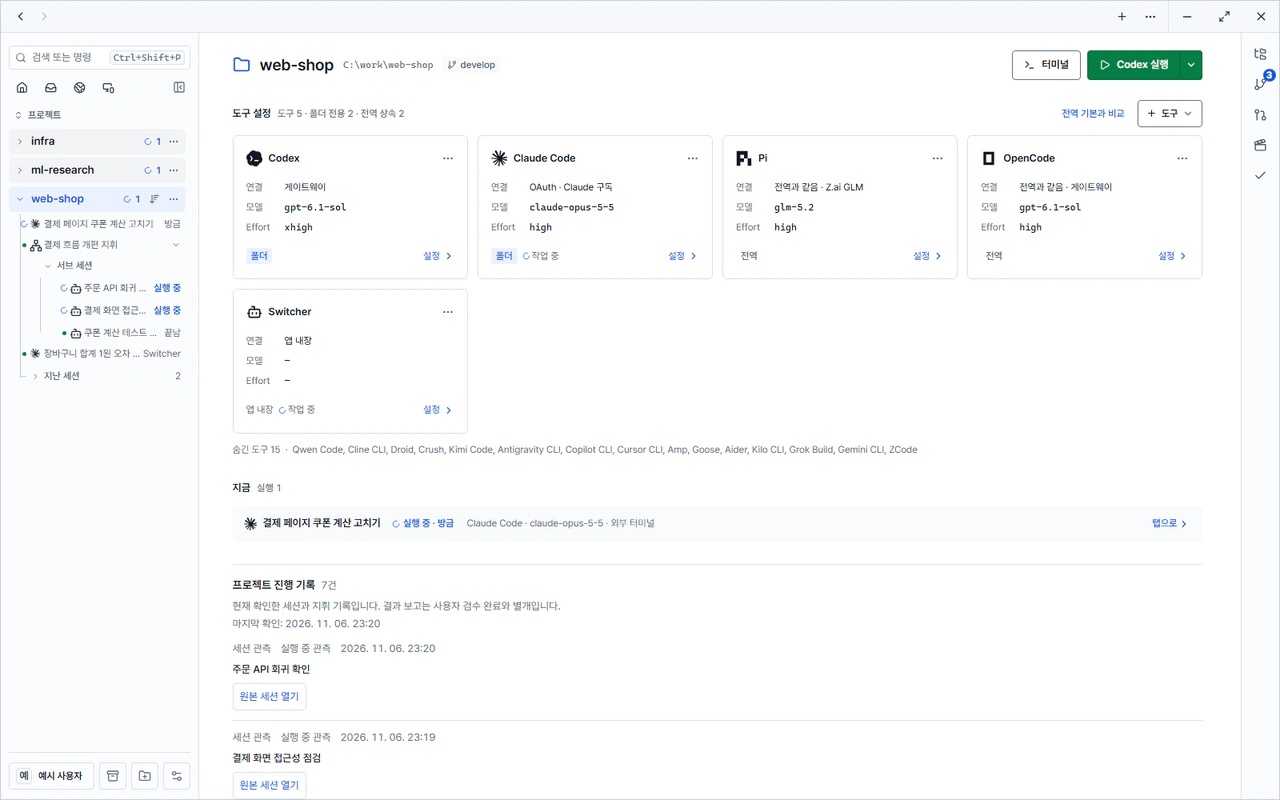
Choose a project to switch to the tool settings screen for that folder.

Example screen Example home screen of the web-shop project. Each tool settings card shows a different connection and model.

Key features

Switcher chat

Chat directly with Claude Code, Codex, Antigravity CLI, and more inside the app, without a terminal. See reasoning, tool calls, file changes, and approvals in one timeline, and pick up the same chat after reopening the app.

Learn more: Switcher chat
Example screen Example Switcher chat screen

Continue on your phone

View and type into your PC's terminals and Switcher chats from the PWA or Android app. The relay server only forwards ciphertext.

Learn more: Continue on your phone
Example screen Example phone app screen

Orchestration

A coordinator session splits work and hands it to worker sessions, and tracks progress and result reports in one ledger.

Learn more: Orchestration
Example screen Example orchestration task and delivery screen

Multiple PCs and usage statistics

Open and use your other PCs signed in to the same Google account from the rail. Token usage is aggregated by tool, model, and project.

Learn more: Multiple PCs and usage statistics
Example screen Example usage statistics screen

How it works

  1. Install

    Download and install the app for Windows, macOS (Apple Silicon), or Linux.

    Install and first run
  2. Add connections

    Add the connections you use: API keys, gateways, or ChatGPT and Claude subscription logins. Keys are stored encrypted in the OS secure storage.

    Add connections
  3. Assign agents and models to projects

    Add a project folder and set the connection, model, and reasoning effort for each tool. Folders without their own settings use the global default.

    Per-project settings
  4. Connect your phone

    Turn on phone connection in Settings and scan the QR code to continue chats and terminals on your phone.

    Connect your phone

For organizations

If you need to run your own relay and update servers or integrate with an in-house AI gateway, contact us by email. We will walk you through deployment options and security documentation.